Moving Local Changes to a New Branch in SVN using Subclipse

  1. Select the projects in your workspace that have any changes.
  2. Right-click in the Project/Package Explorer and select team > Branch/Tag
  3. Select the branch you would like to create or type in the path of the new branch. (Make sure to select the option Create any intermediate folders that are missing).
  4. Follow the rest of the prompts.

*If you are moving one project the URL for the branch must contain the project name. If there are multiple projects than you can just use the name of the new branch in the URL.

Fully Qualified Domain Names

Every host on a network is assigned a unique character based name called the Fully Qualified Host Name or Fully Qualified Domain Name (FQDN).

Ex: www.programmingtheweb.com, www.youngbrandon.com

The Domain Name is the last two parts of the FQDN (youngbrandon.com, programmingtheweb.com). These are registered with an internet naming authority that works on behalf of ICANN. The first part of the FQDN is what is known as the Host Name. For example, www is usually given to servers on a network while FTP is assigned to FTP servers. The last part of the FQDN is what is the Top-level Domain (TLD).  ICANN places some restrictions on who can purchase the different TLD’s available although it has loosened its restrictions over time.

Domain Suffix Type of Organization
ARPA Reverse lookup domain (special internet function)
COM Commercial
EDU Educational
GOV Government
ORG Noncommercial organization (such as a nonprofit agency)
NET Network (such as an ISP)
INT International Treaty Organization
MIL United States Military Organization
BIZ Business
INFO Unrestricted use
AERO Air-transport industry
COOP Cooperatives

The Software Development Life Cycle

Step 1 – Acquiring Problem Specifications

Getting a problem from a client or identify the problem yourself
This includes information about the data or information used in the problem
How should the task receive Input?
How should it produce Output?

Step 2 – Problem Analysis


Analyze the problem, procedure, and given specifications.
may reveal hidden specifications or problems that were not evident in Step 1
If needed, go back to step 1 to verify new specifications
Create testing scenarios.
Define expected outputs for given inputs

Step 3 – Algorithm Design


Design a solution to the problem (DO NOT WRITE CODE YET)
Create an algorithm to solve the problem and test it against scenarios from Step 2
Algorithm: A descriptive process (step-by-step solution) that ends at a solution to a problem.
Consists of a finite number of steps (or instructions).
Each step is well defined and understandable by a computing agent
The algorithm must stop at a solution.
The algorithm should be generalizable to a set of problem instances
There are potentially infinite variations for algorithms that solve the same problem.

Step 4 – Program Implementation


Convert the Algorithm into the target programming language
Programs should be well documented using docstrings and in-line comments
Check code with test scenarios used created in Step 2 and used in Step 3

Step 5 – Program Deployment

Put the program in active use by:
releasing it to the client and possible installing it into their system.
integrating it into an existing software package using an existing API (application programming interface).

Step 6 – Program Maintenance

Updating the program for specifications that may have changed or to allow for functionality with new components if part of a software package.
Receive error reports, which may require a problem statement re-definition and analysis (go back to step 1)
Use of constants instead of literal values and good documentation makes this much easier.

Intro to Java

Java is an object-oriented programming language.

  • Java is a high-level programming language
    • more human understandable than assembly or machine code
    • The language is compiled to another language (bytecode) which is then understood by the machine (the Java Virtual Machine (JVM))
    • High-level languages allow programmers to use abstraction to write complex instructions using a single command.
  • Java programs are executed on the Java Virtual Machine (JVM).
    • Java programs are compiled to bytecode, which is a defined set of instructions that are recognized by the Java Virtual Machine.
    • This bytecode can be executed on a JVM on any operating system platform (provided that a JVM has been written for that platform.)
    • Java virtual machines handle “garbage collection” to avoid memory leaks that occur in other languages.
  • Java is strictly object-oriented, unlike Python which just happens to contain object-oriented elements
    • Object-Oriented programs are organized into objects
    • Each object has a set of attributes with values (the object’s state) and a set of methods (ways of modifying the object’s state)
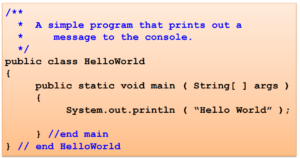
Java Class Example


  • The top of the program contains JavaDocs which are used to describe a program, class, method, or variable
  • The comments at the bottom are in-line comments that are used to describe individual lines of code
  • Everything inside the first set of curly braces is whats known as an Object.
  • public class HelloWorld is known as the class header
    • The class name should always be capitalized
  • The code inside is known as the class body
  • The inner set of curly braces is whats known as a method
  • public static void main is the method header
    • main is a method name and should be lowercase
  • (String[] args) are the parameters of the method
    • args is an identifier and should also be lowercase
  • inside the method is known as the method body
  • Each line of executable code known as a statement must end with a semi-colon